EscrowPK Workflow, Step 10: Raising and Resolving a Dispute
By the EscrowPK Team · 2026-07-29 · 5 min read
When a deal genuinely goes wrong — the item doesn't match what was described, delivery never shows up, or a seller stops responding — this is the step that exists for exactly that moment. This is Step 10, the final article in our EscrowPK workflow series: disputes.
How do you raise a dispute on EscrowPK.com?
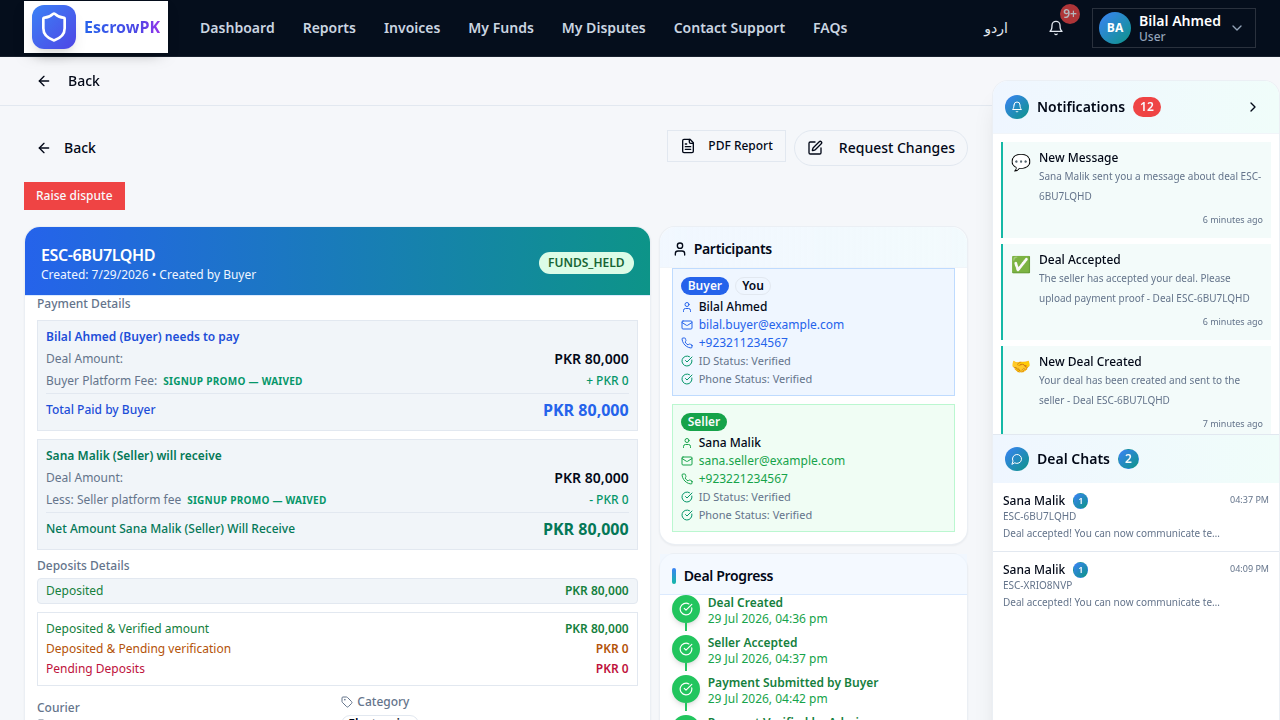
From the deal page, either party can raise a dispute, selecting a category — like item not as described, late delivery, or seller not responding — and submitting a reason along with any supporting evidence. This immediately pauses the release of funds while the dispute is open.
What happens after a dispute is raised?
The other party is given a window to respond, and the two sides can attempt to negotiate a resolution directly. If they can't agree, the dispute moves into formal arbitration, where each side pays a small arbitration fee and EscrowPK's team reviews the evidence and makes a binding decision.
What if the resolution involves sending the item back?
Some disputes are resolved by requiring the item to be returned to the seller before funds are released — EscrowPK tracks that return in transit and verifies it's actually received before closing out the dispute and releasing funds accordingly.
Does raising a dispute mean I lose my money?
No — raising a dispute is what protects your money. It's specifically the mechanism that stops funds from being released automatically when something is wrong, replacing a silent loss with a structured, evidence-based process that ends in a decision either side can act on.
That completes the full EscrowPK workflow, start to finish — from verifying your identity to resolving a dispute if one ever comes up. Every step exists to remove a specific risk from online deals in Pakistan. Create your free account on EscrowPK.com and put the whole process to work on your next transaction.